Agentic AI
Ship Your First Managed Agent: A Complete Guide to Anthropic's New Platform
MA
Mehwar AI Team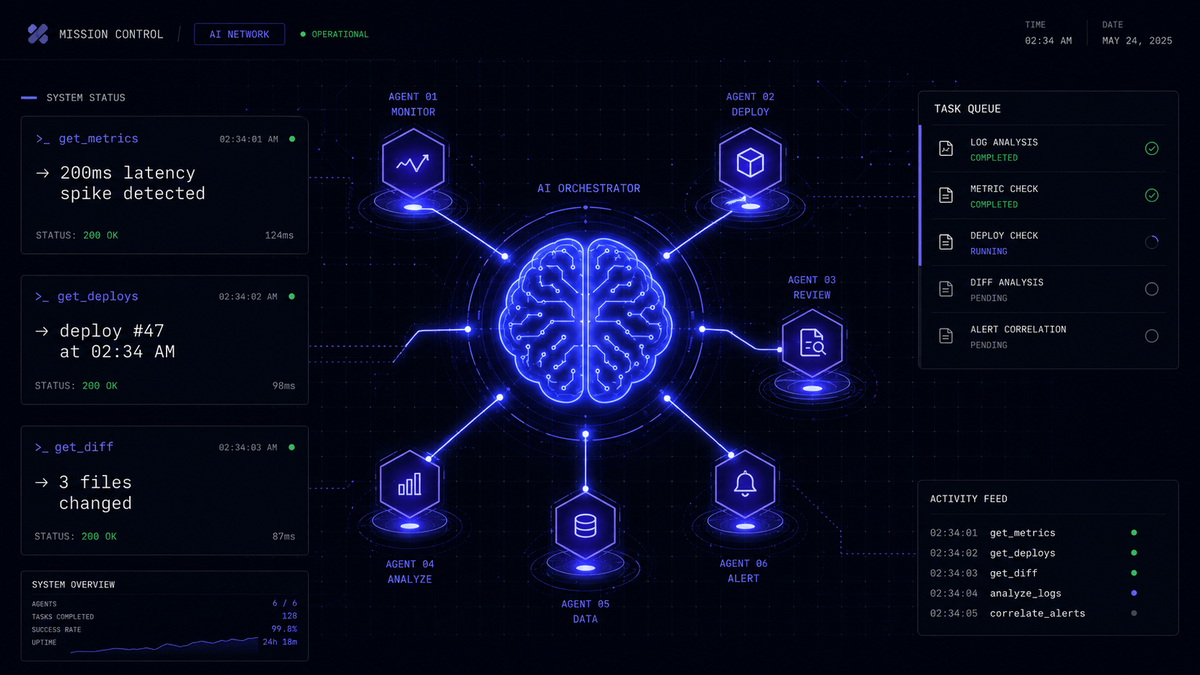
Anthropic recently published one of the most practical AI engineering guides of the year — a 37-minute walkthrough of their new Managed Agents platform that shows exactly how to build and ship a production-ready AI agent in six functions.
The video covers building a complete incident-investigator agent from scratch: defining the Agent, Environment, and Session, streaming events in real time, and wiring up custom tools — all the way to a running production agent.
Here is our complete breakdown.
What is Anthropic's Managed Agents Platform?
Anthropic's Managed Agents platform is a server-side infrastructure layer that handles the hard parts of running AI agents in production — state management, event streaming, tool execution, and the agent loop itself.
Instead of building your own agent runtime, you define three core primitives:
An Agent is the AI system itself — it holds the model configuration, system prompt, and the list of tools the agent can use. Think of it as the brain of your system.
An Environment is the execution context — it defines what resources and tools the agent has access to. This is where you register your custom tools like get_metrics, get_deploys, and get_diff.
A Session is a single run of the agent — it connects an Agent to an Environment and manages the conversation loop, state persistence, and event streaming.
The Six Core Functions
The entire managed agent is built around six functions. This minimalism is intentional — Anthropic designed the platform to be approachable without sacrificing production capability.
The first function defines your agent configuration — model choice, system prompt, and tool declarations. Keep the system prompt focused on the agent's specific job. An incident investigator should know it is investigating incidents, not acting as a general assistant.
The second function sets up your environment and registers tools. Each tool is declared with a name, description, and input schema. The description is critical — Claude uses it to decide when and how to call each tool.
The third function implements your tool handlers. This is where your custom logic lives — reading from databases, calling APIs, querying metrics systems. The handle_tool dispatch pattern routes each tool call to the right handler function.
The fourth function creates a session and starts the agent loop. You stream events from the session, which gives you real-time visibility into what the agent is doing — thinking, calling tools, receiving results.
The fifth function processes streamed events. Each event type has a different meaning: text events are the agent's reasoning and responses, tool_use events are tool calls, tool_result events are the outcomes.
The sixth function handles the terminal state — when the agent decides it has enough information to produce a final answer or when it needs human input to proceed.
The Incident Investigator Pattern
The demo builds a concrete incident investigator agent with three tools that every engineering team needs:
get_metrics pulls current system performance data — error rates, latency, throughput. The agent uses this to understand the current state of the system.
get_recent_deploys returns the deployment history for a given time window. Correlating deployment events with metric degradation is the most common way to identify root causes.
get_diff retrieves the code changes associated with a specific commit or deploy. When the agent identifies a suspicious deploy, it can automatically pull the diff and analyze what changed.
With these three tools, the agent can autonomously investigate an incident end-to-end: detect the anomaly in metrics, correlate it with a recent deploy, pull the diff, and produce a structured incident report — all without a human manually querying each system.
Production Features on the Roadmap
Beyond the core agent loop, Anthropic's platform includes several production features worth knowing:
Subagents allow your main agent to spawn specialized child agents for specific tasks. An incident investigator could spawn a database specialist agent and a network specialist agent simultaneously, then synthesize their findings.
Vaults provide secure secret management — your agent can access API keys, database credentials, and other sensitive configuration without those secrets appearing in your code or prompts.
Memory enables agents to persist information across sessions. An incident investigator with memory can recognize recurring patterns across incidents over time and build institutional knowledge.
Why This Matters for Engineering Teams
What Anthropic is building is the infrastructure layer that makes AI agents as easy to deploy as web services. The six-function pattern they demonstrate is deliberately minimal — you can understand the entire system in an afternoon and have a running agent by the end of the day.
This is significant because it lowers the barrier to production agent deployment from weeks of infrastructure work to hours of focused engineering.
At Mehwar AI, we have been building production agents for enterprise clients using LangGraph and Claude. The patterns Anthropic demonstrates in this guide align closely with what we have seen work in production: explicit tool definitions, structured event streaming, clean separation between agent logic and tool implementation.
Getting Started
Watch the full 37-minute guide on the Claude YouTube channel — search for "Ship your first Managed Agent" or use the link below.
If you want to implement a managed agent at your organization — whether for incident investigation, lead qualification, document processing, or workflow automation — we can help you go from concept to production in weeks.
Get in touch at hello@mehwarai.com or book a free consultation at mehwarai.com/contact.
Watch the full video: https://www.youtube.com/watch?v=19HDQ9HppOA
Need a build partner?
Let's build something worth documenting.
If you need a production system that improves response times, cuts manual work, or gives your team better access to knowledge, we can help.